Google Drive’s New AI Intervention Stops Ransomware Proliferation Across Microsoft Office Documents and More
An Entirely New, AI-Powered Layer of Defence Helps Prevent Businesses, Schools, Hospitals, Government Agencies, and Others from Being Disrupted by Destructive Ransomware Attacks

Ransomware remains one of the most damaging cyber threats facing organisations today. These attacks can lead to substantial financial losses, operational downtime, and data compromise, impacting organisations of all sizes and industries, including healthcare, retail, education, manufacturing, and the public sector. In fact, intrusions related to ransomware represented 21% of all intrusions observed by Mandiant (part of Google Cloud) in 2024, with the cost of an average ransomware or cyber extortion incident exceeding USD$5 million.
According to Mandiant’s investigations in 2024, 89% of Japan and Asia Pacific (JAPAC) organisations hit by ransomware only learned of the intrusion from an outsider (e.g., the adversaries themselves; law enforcement). This statistic highlights a deficiency in internal detection and intervention capabilities, as most organisations in the region only learn they are compromised when the ransom demand arrives or a third party “sounds the alarm.”
Native Google Workspace documents (e.g., Google Docs; Google Sheets) are not impacted by ransomware. Google’s ChromeOS has also never had a ransomware attack. However, ransomware is a persistent threat for other file formats (e.g., PDF documents; Microsoft Office documents) and desktop operating systems (e.g., Microsoft Windows). Proactively addressing this, Google Cloud has announced that it is enhancing Google Drive for Desktop with Artificial Intelligence (AI)-powered ransomware detection and intervention to automatically stop file syncing, and allow users to easily restore files with a few clicks.

The Traditional Approach to Fighting Ransomware Is Insufficient
To-date, ransomware has largely been treated as an antivirus issue: seek out potentially malicious code before it is activated and block it from entering an IT system. This is an important and necessary defence, but as the continued success of ransomware attacks over the last few years show, this approach is ultimately insufficient, given that once novel ransomware bypasses traditional antivirus protection, the user and their organisation can be compromised without any fallback mitigations.
Ransomware is also no longer just an IT issue; it has become increasingly disruptive for core business operations, such as manufacturing lines, retail operations, hospital services, or immigration services. It is, therefore, paramount to find a more comprehensive way to fight ransomware.
Hana Raja, Country Manager, Malaysia, at Google Cloud, said: “What we’re unveiling and making available today is an entirely new layer of defence. While antivirus solutions continue their work to stop ransomware from getting in, we’ve built the protections to stop it from being effective once it is inevitably through the door. Our AI-powered detection and intervention in Google Drive for Desktop identifies the core signature of a ransomware attack—an attempt to encrypt files en masse—and rapidly intervenes to put a ‘protective bubble’ around a user’s files before it can spread, by automatically stopping file syncing to the cloud. This helps to stop ransomware from doing what it must to be most effective: corrupt important files and make them unusable.”
“In addition, existing built-in malware defences in Google Drive help to keep ransomware from spreading to other devices and taking over an entire network. As a collective, these defences will help prevent businesses, schools, hospitals, government agencies, and others from being disrupted by the types of ransomware attacks that have been so destructive up to this point,” said Raja.
How Google Drive for Desktop’s AI-Powered Ransomware Detection and Intervention Works
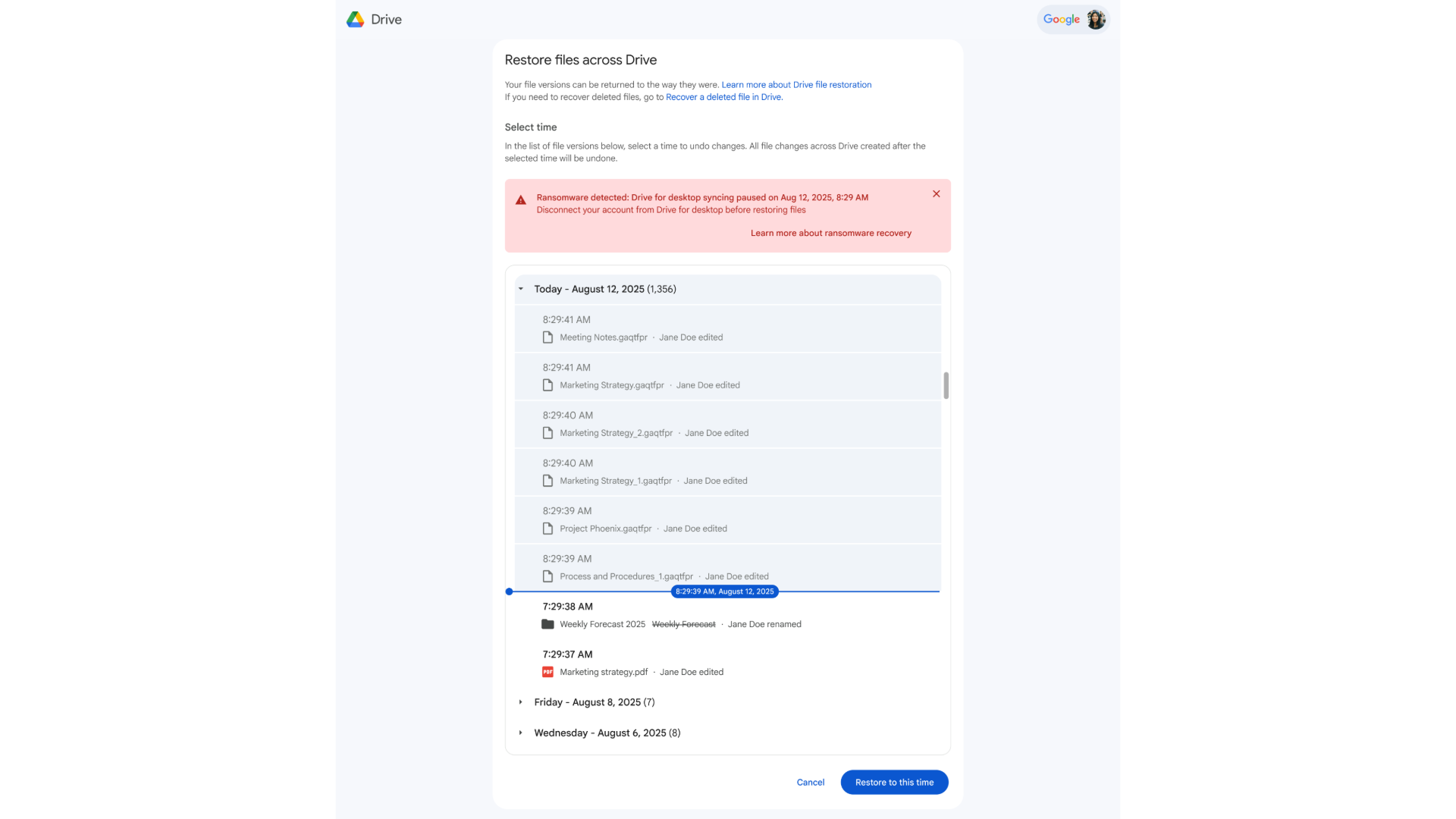
Google Drive for Desktop, available on Windows and macOS, is used to efficiently and securely sync user files and documents to the cloud. It can also be used as a critical line of defense against malware and ransomware attacks. With that in mind, Google Cloud has built a proprietary AI model, trained on millions of real-world ransomware samples, to look for signals that a file has been maliciously modified. The detection engine adapts to novel ransomware by continuously analysing file changes and incorporating new threat intelligence from VirusTotal. When Google Drive detects unusual activity that suggests a ransomware attack, it automatically pauses syncing of affected files, preventing widespread data corruption across a user’s Google Drive.
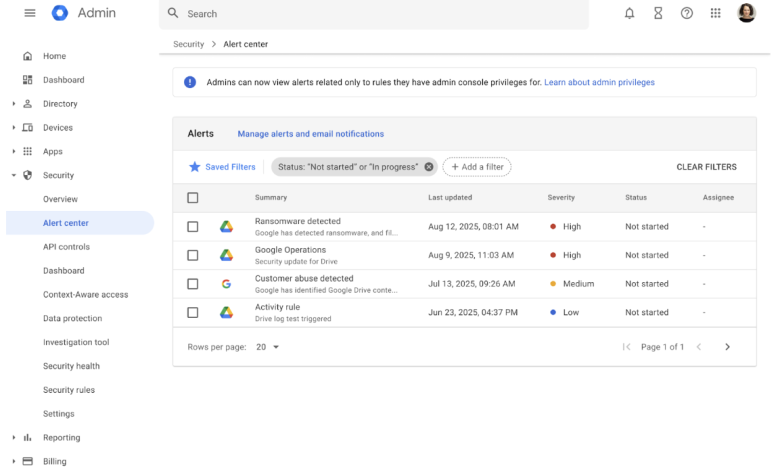
Users then receive an alert on their desktop and via email, guiding them to restore their files. Unlike traditional solutions that require complex re-imaging or costly third-party tools, the intuitive web interface in Google Drive allows users to easily restore multiple files to a previous, healthy state with a few clicks. This rapid recovery capability helps to minimise user interruption and data loss.
For IT teams, administrators maintain the required visibility and control by receiving alerts in the Admin console for detected ransomware activity. Administrators can leverage the security center to review the audit log with detailed information. This new capability is turned on by default for all Google Workspace customers, but administrators have the controls to disable detection, intervention, and restoration capabilities for end users, if needed.
What’s Next
Rolling out starting today in an open beta, AI-powered ransomware detection and intervention is one of the many enterprise-grade security controls in Google Drive that provide robust protection of sensitive data and business continuity for organisations of all sizes. It is included in most Google Workspace commercial plans at no additional cost. Consumers also benefit from the file restoration capability, specifically, at no additional cost.
Learn more about these new capabilities and download Google Drive for Desktop today.